
Instruction for AEcroscoPy WaveVI Interface#
\(_{Yongtao}\) \(_{Liu,}\) \(_{liuy3@ornl.gov}\)
\(_{February}\) \(_{2026}\)
Overview#
PyWaveVI is the AEcroscoPy interface for the LabVIEW-based DAQ control application (PyScanner, running as PyScanner_FPGA_6124_01.exe). It manages communication with the NI-6124 DAQ card to upload and execute voltage waveforms for AFM experiments.
The typical workflow is:
Initialize a
PyWaveVIinstance pointing to the PyScanner executable.Configure I/O settings (amplifier, channels, timeout).
Generate a waveform with
WaveGeneratorand upload it viaset_AO_waveforms().Execute the waveform with
set_IO_control()or the lower-levelupload_to_6124()/run_6124_IO_10().
Import#
import numpy as np
import matplotlib.pyplot as plt

from aecroscopywave.interfaces import WaveVI
from aecroscopywave.wavebuilding import WaveGenerator
Initialize PyWaveVI#
Provide the path to the PyScanner executable. PyWaveVI launches the application and establishes a COM connection. Ensure the path matches your local installation.
_path = r'C:\Users\PyScanner_FPGA_6124_01\PyScanner_FPGA_6124_01.exe'
pyvi = WaveVI.PyWaveVI(app_path = _path)
Get I/O Settings#
Returns the current I/O setting indices (integer codes). These correspond to hardware configuration options like amplifier selection and channel enable flags, not the physical values.
pyvi.get_IO_settings()
{'trigger_type': 0,
 'AO_num_channels': 0.0,
 'IO_rate': 0.0,
 'AI_range': 0.0,
 'AO_range': 0.0,
 'AO_amplifier': 0.0,
 'IO_trigger_ring': 0,
 'IO_timeout': 20.0,
 'AI_ch01': False,
 'AI_ch02': False,
 'AI_ch03': False}
Get I/O Parameters#
Returns the actual physical I/O parameters (e.g., sample rate, voltage ranges) based on the current settings. Use this to verify the hardware configuration before running an experiment.
pyvi.get_IO_parameters()
{'IO_rate_b': 0,
 'IO_AO_range_b': 0.0,
 'IO_AO_routing_b': 0.0,
 'AO_amp_b': 0.0,
 'IO_AI_range_b': 0.0,
 'AI Actual Rate': 4000000.0,
 'AO Actual Rate': 4000000.0,
 'samples per channel': 0}
Change I/O Settings#
Update I/O settings by passing a dictionary of setting keys and values. Common keys: AO_amplifier (output amplifier index), IO_timeout (seconds), AI_ch01/02/03 (enable input channels).
pyvi.set_IO_settings(IO_setting_dict ={"AO_amplifier": 1, "IO_timeout": 5, "AI_ch01": 1, "AI_ch02": 1, "AI_ch03": 1})
Set Band Excitation Wave#
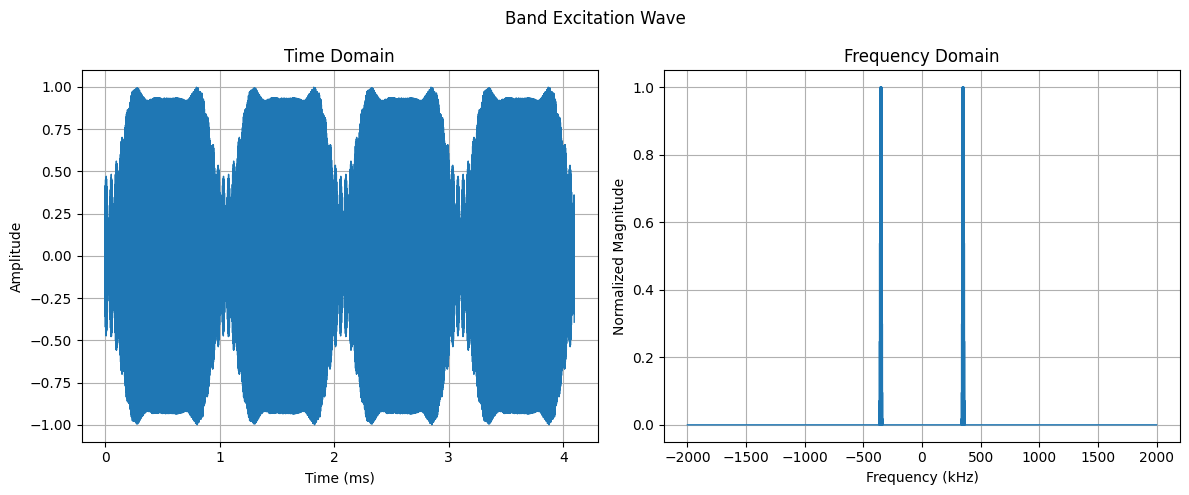
Generate a Band Excitation waveform with WaveGenerator.be_wave() and upload it to the LabVIEW interface. The BE wave spans a frequency band around a center frequency for multi-frequency piezoresponse imaging.
# Set basic BE excitation wave using function from PyWaveGenerator
BE_wave, FFT_BE, w_vec, BE_hot_bin_ind  = WaveGenerator.be_wave(BE_band_center = 350E3, BE_band_width = 30E3, BE_amplitude = 1.0,
                                                                  BE_repeats = int(2), BE_pulse_duration_req = 4.0E-3, BE_phase_variation=1)

# Plot the BE wave
WaveGenerator.plot_BE_wave(BE_wave, FFT_BE, w_vec, IO_rate=4e6,title="Band Excitation Wave")
Upload Waveform to LabVIEW#
set_AO_waveforms() uploads the waveform to the LabVIEW VI buffer. Set zero_tail=True to append a zero-voltage tail after the waveform, ensuring the output returns to 0 V at the end.
pyvi.set_AO_waveforms(waveform = BE_wave, zero_tail= False)
Waveform duration: 0.004096 s
Get Current Output Waveform#
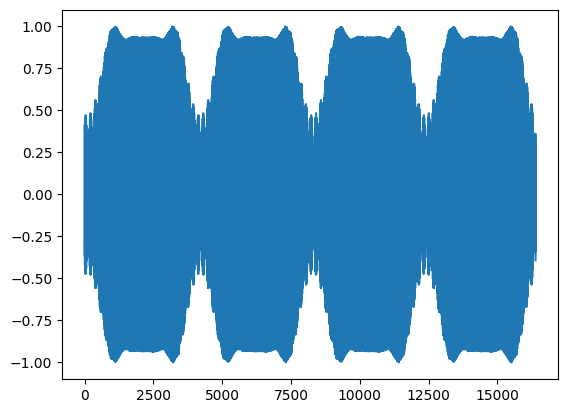
Reads back the waveform currently loaded in the LabVIEW VI buffer. Note: this reflects what is in the VI, which may differ from what has been sent to the NI-6124 card.
current_waveform = pyvi.get_AO_waveforms()
plt.plot(current_waveform)
Waveform duration: 0.004096 s
[<matplotlib.lines.Line2D at 0x1d3bfd625d0>]
Get Acquired Input Waveform#
Reads the acquired analog input (AI) data from the LabVIEW interface after an experiment has run. This contains the raw measured signal (e.g., cantilever deflection, lock-in output).
pyvi.get_AI_waveforms()
array([], dtype=float64)
Clear NI-6124 Device#
Resets the NI-6124 DAQ card buffer. This is typically required before uploading a new waveform to ensure no stale data remains.
pyvi.clear_6124()
Upload Waveform to NI-6124#
Transfers the waveform from the LabVIEW VI buffer to the NI-6124 card memory, making it ready for hardware execution.
pyvi.upload_to_6124()
Execute Waveform#
run_6124_IO_10() triggers the NI-6124 card to output the uploaded waveform and simultaneously acquire the input signals.
set_IO_control() is a higher-level convenience method that combines clear, upload, and execute steps into a single call with flags: clear, upload, do_IO, and fetch_result.
pyvi.run_6124_IO_10()
pyvi.set_IO_control()
array([], dtype=float64)